How to Find Online Platforms for Remote Team Collaboration: Ultimate Guide
Finding the right online platform for remote team collaboration can feel overwhelming. You want a tool that keeps your team connected, organized, and productive, no matter where everyone is working from.
But with so many options out there, how do you know which one fits your team’s unique needs? This article will guide you step-by-step to discover platforms that truly enhance your remote teamwork.
By the end, you’ll have clear insights to choose the perfect collaboration tool that boosts your team’s efficiency and keeps everyone engaged.
Ready to transform how your team works together? Let’s dive in.
Choosing The Right Platform
Choosing the right online platform for remote team collaboration shapes how your team works together. The best platform fits your team’s style, needs, and goals. It boosts communication and keeps projects on track.
Picking the right tool saves time and reduces confusion. It also makes teamwork smoother and more productive. Focus on what matters most to your team. Understand your options clearly before making a choice.
Assessing Team Needs
Start by listing your team’s main tasks and challenges. Consider how your team communicates daily. Think about the size of your group and its work style. Does your team need real-time chat or more structured project tracking?
Identify must-have features like file sharing or video calls. Check if your team works across different time zones. Knowing these needs helps narrow down your platform options.
Key Features To Consider
Look for tools that support easy messaging and video meetings. Task management features keep work organized and visible to all. File sharing should be simple and secure. Integration with other tools your team uses is helpful.
Check if the platform offers mobile and desktop versions. Strong security and privacy controls protect your data. User-friendly design reduces learning time and errors.
Budget And Pricing Models
Set a clear budget before exploring platforms. Many tools offer free basic plans with limited features. Consider if paid plans add value worth the cost. Check if pricing depends on team size or features used. Look for flexible plans that grow with your team.
Factor in costs for training and support if needed. Choose a platform that balances features and affordability.

Top Collaboration Tools
Choosing the right collaboration tools is key for remote teams. These tools help teams communicate, organize tasks, and share ideas easily. They make work more efficient and keep everyone connected. Here are some popular categories of tools that support remote collaboration.
Instant Messaging Apps
Instant messaging apps allow quick and direct communication. Teams can send messages, share files, and create group chats. Popular apps like Slack and Microsoft Teams offer real-time conversations and notifications. These tools reduce email overload and help teams stay in touch throughout the day.
Project Management Software
Project management software helps teams plan and track their work. Tools like Trello and Asana organize tasks with boards, lists, and timelines. They show who is responsible for each task and the progress made. These apps improve task visibility and keep projects on schedule.
Video Conferencing Solutions
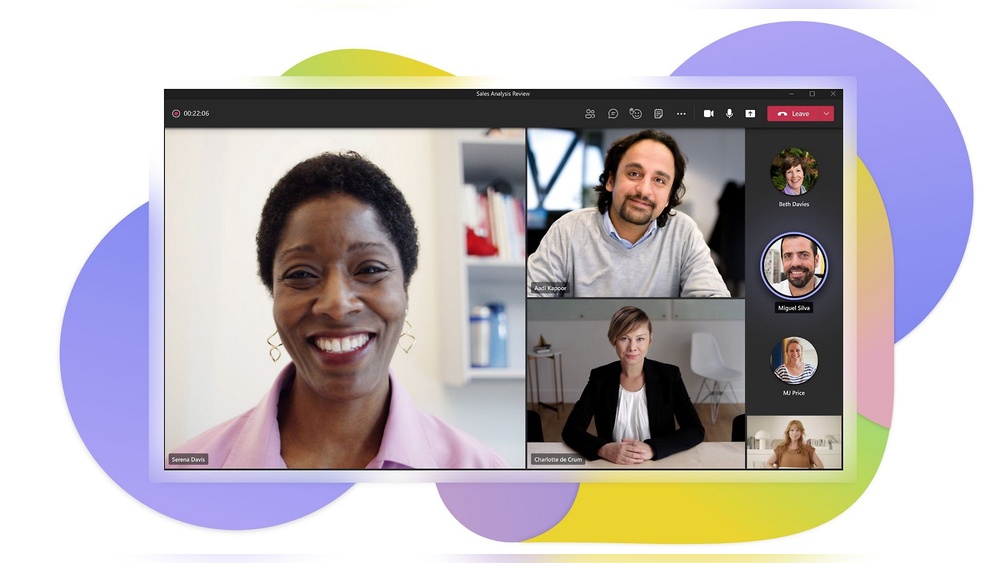
Video conferencing tools enable face-to-face meetings online. Zoom and Google Meet provide video calls, screen sharing, and recording features. These tools create a virtual meeting space for discussions, presentations, and team check-ins. They help build stronger team connections despite distance.
Cloud Storage And File Sharing
Cloud storage solutions store files safely online. Google Drive and Dropbox let teams upload, access, and share documents from anywhere. These tools support collaboration by allowing multiple users to edit files simultaneously. They keep files organized and easy to find.
Virtual Whiteboarding Tools
Virtual whiteboards offer a digital space for brainstorming and planning. Tools like Miro and MURAL let teams draw, add notes, and create diagrams together. They simulate an in-person meeting room and encourage creative teamwork. These tools work well for workshops and strategy sessions.
Evaluating Platform Capabilities
Choosing the right online platform for remote team collaboration means carefully checking what it offers. Evaluating platform capabilities helps ensure smooth teamwork, clear communication, and efficient task management. Each team’s needs differ, so consider features that fit your specific workflow.
User Interface and Experience
The platform should have a clean and simple design. Easy navigation saves time and reduces user frustration. Intuitive menus and clear icons improve usability and workflow efficiency.
A good user interface helps team members adopt the tool quickly with minimal training. Testing platform ensures it feels natural, responsive, and user-friendly across devices.
Integration With Other Tools
Check if the platform connects with apps your team already uses. Integration with email, calendars, and file storage boosts productivity.
It prevents switching between multiple tools constantly. Seamless syncing of data ensures all work stays up to date. Platforms supporting popular apps reduce workflow disruptions.
Security And Privacy Measures
Security is vital for protecting team data. Ensure the platform uses encryption for messages and files. Look for options like two-factor authentication to secure accounts.
Privacy policies should clearly explain data handling. Choose platforms that comply with industry standards and regulations.
Mobile Accessibility
Remote teams often work from various locations. The platform must work well on smartphones and tablets. Mobile apps should offer most desktop features. Easy access on the go keeps everyone connected. Test the platform on different devices for smooth performance.
Boosting Team Productivity
Boosting team productivity is essential for remote work success. Efficient collaboration tools help teams stay connected and focused. They reduce confusion and save valuable time. Teams can achieve more by organizing communication, tasks, and creative efforts effectively.
Streamlining Communication
Clear communication keeps everyone on the same page. Online platforms offer chat, video calls, and instant messaging. These features allow quick sharing of ideas and updates. Teams avoid long email chains and missed messages. Fast responses help solve problems sooner and keep work moving.
Coordinating Tasks And Deadlines
Task management tools assign work and set deadlines clearly. Everyone knows what to do and when to finish. These platforms show progress in real-time, so no task is forgotten. They send reminders to keep deadlines visible. This coordination helps teams meet goals without stress or delay.
Enhancing Creative Collaboration
Creative work improves with shared ideas and feedback. Online platforms provide virtual whiteboards and document sharing. Team members can brainstorm and edit together easily. This openness encourages innovation and better solutions. Creative collaboration tools make remote teamwork feel natural and engaging.
Collaboration Frameworks
Collaboration frameworks help remote teams work together smoothly. They create clear paths for teamwork and communication. These frameworks focus on key areas that keep teams aligned and productive. Using them can improve how teams share ideas and meet goals online.
Choosing the right framework supports strong connections and efficient workflows. It also helps teams stay organized and focused on results. Here are some important parts of collaboration frameworks for remote teams.
Purpose And Goals Alignment
Teams need a shared mission to guide their work. Clear goals help everyone understand what to achieve. This alignment keeps efforts focused and reduces confusion. Teams perform better when they know their purpose and targets.
Building The Right Team Culture
Culture shapes how team members interact daily. Remote teams must build trust and respect despite distance. A positive culture encourages open communication and support. It creates a sense of belonging and motivates everyone.
Designing Virtual Workspaces
Virtual spaces must be easy to use and accessible. The right tools bring team members together online. Organized workspaces help manage tasks, share files, and hold meetings. They make remote work feel connected and efficient.
Implementing Efficient Processes
Clear workflows reduce delays and misunderstandings. Processes define who does what and when. They include rules for communication, task management, and decision-making. Good processes keep the team moving forward smoothly.
Tracking Deliverables And Outcomes
Measuring progress shows if goals are met on time. Tracking tools highlight completed tasks and upcoming deadlines. This visibility helps teams stay accountable and adjust plans quickly. Regular updates ensure success and continuous improvement.

Common Challenges and Solutions
Remote collaboration is evolving rapidly. New technologies shape how teams work together across distances. These future trends help teams stay connected and productive.
Understanding these trends guides the choice of online platforms. It also prepares teams for smoother, smarter collaboration in the future.
AI and Automation Features
AI simplifies many tasks in remote collaboration. It can automate scheduling meetings and managing tasks. AI-powered chatbots answer common questions instantly. Automation reduces manual work and saves time. Smart assistants help summarize meetings and track deadlines. These features help teams focus on creative work and decision-making.
Enhanced Virtual Reality Tools
Virtual reality (VR) makes remote meetings feel more real. VR creates 3D spaces where team members interact naturally. It improves communication and builds stronger connections. Teams can hold virtual brainstorming sessions and workshops.
VR tools support hands-on training and product demos. This technology brings a new level of presence to remote work.
Data-driven Collaboration Insights
Data analysis improves teamwork and project success. Platforms gather data on how teams communicate and perform. Insights show which tasks take longer or cause delays. Managers use this data to improve workflows and set priorities.
Data helps identify skill gaps and training needs. These insights lead to smarter decisions and better results.

FAQ:
What’s The Leading Collaboration App for Remote Teams?
Slack leads as the top collaboration app for remote teams, offering instant messaging, file sharing, and integrations. Microsoft Teams excels in integrated workflows. Zoom is preferred for virtual meetings. Trello and Asana manage projects and tasks efficiently. Google Workspace supports cloud-based collaboration seamlessly.
What Are The 5 P’s of Collaboration?
5 P’s of collaboration include Purpose, People, Place, Processes, and Products or Progress. These elements guide effective teamwork by aligning goals, defining roles, shaping the work environment, improving workflows, and measuring outcomes. This collaboration framework helps teams work efficiently and achieve meaningful results.
What Is the Best Online Collaboration Tool?
The best online collaboration tool depends on specific needs and team goals. Popular options include Slack for team messaging, Zoom for virtual meetings, Trello for project management, and Google Workspace for cloud-based collaboration.
Selection should be based on features such as real-time communication, task tracking, file sharing, or design collaboration.
What Are The 3 C’s of Collaboration?
3 C’s of collaboration are Communication, Cooperation, and Coordination. These core elements ensure effective teamwork, clear goal alignment, and efficient task execution. Strong collaboration built on the 3 C’s improves productivity, accountability, and overall team performance.
Choosing the right platform boosts remote teamwork and productivity. Test options based on your team’s size and needs. Prioritize tools that simplify communication and task management. Keep the user experience simple for all team members. Regularly review platform features to ensure ongoing fit.
Good collaboration tools help teams stay connected and efficient. Start small, learn, and adjust as your team grows. Effective tools make remote work smoother and more enjoyable.
https://akperbinalitasudama.ac.id/
https://akfisstlukastomohon.ac.id/
https://akbidjakartamitrasejahtera.ac.id/
https://akperpemkabacehtenggara.ac.id
https://aklpemprovsumsel.ac.id/
https://poltekkessbengkulu.ac.id/
https://akabidartakabanjahe.ac.id/
https://atrowidyadharma.ac.id/
https://akbidhafsyahmedan.ac.id/
https://akbidindahmedan.ac.id/
https://akbiddelhusdelmed.ac.id/
https://akperharapanmamadeliserdang.ac.id/
https://stmiktrigunapati.ac.id/
https://akbidikabinalabuhanbatu.ac.id/
https://akbidbungabangsaaceh.ac.id/
https://ejournal.akbidbungabangsaaceh.ac.id/
stikes cianjur
stikes demak
stikes garut
stikes gorontalo
stikes gowa
stikes gresik
stikes pacitan
stikes pamekasan
stikes pandeglang
stikes pangandaran
strong democracy
suara aceh
suara banten
suara jabar
suara jambi
suara jateng
suara jatim
suara jogja
suara riau
suara sumsel
suara sumut
sumut ekspres
talking magpie
Tambang Nusantara
Tanam Maju
Tani Mart
tea parent repeat
telecom blue
tempo harian
tempo jogja
tempo medan
tempo papua
thecakewala
thefaciahub
the generation hub
thenewsweek
thomson thorn
tour music fest
https://akperbinalitasudama.ac.id/
https://akfisstlukastomohon.ac.id/
https://akbidjakartamitrasejahtera.ac.id/
https://akperpemkabacehtenggara.ac.id
https://aklpemprovsumsel.ac.id/
https://poltekkessbengkulu.ac.id/
https://akabidartakabanjahe.ac.id/
https://atrowidyadharma.ac.id/
https://akbidhafsyahmedan.ac.id/
https://akbidindahmedan.ac.id/
https://akbiddelhusdelmed.ac.id/
https://akperharapanmamadeliserdang.ac.id/
https://stmiktrigunapati.ac.id/
https://akbidikabinalabuhanbatu.ac.id/
https://akbidbungabangsaaceh.ac.id/