Review of Popular Time Management Tools for Busy Professionals: Ultimate Guide
Feeling overwhelmed by your never-ending to-do list? You’re not alone.
Managing your time effectively is the key to staying productive and reducing stress, especially when your schedule is packed. But with so many time management tools out there, how do you know which one will truly make a difference for you?
You’ll discover honest reviews of the most popular time management tools designed specifically for busy professionals like you. By the end, you’ll have a clear idea of which tools can help you take control of your day, boost your productivity, and finally get things done without the constant rush. Keep reading to find the perfect fit for your workflow.
Top Time Management Tools
Top time management tools help busy professionals stay organized and focused. These apps simplify task tracking and boost productivity. Choosing the right tool can save time and reduce stress.
Here is a review of popular options. Each tool offers unique features to fit different work styles.
Todoist
Todoist is a powerful task manager with a clean interface. It supports project organization with labels and filters. Users can set priorities and deadlines easily. It works on many devices, syncing tasks in real time. Todoist also offers reminders and collaboration features.
Microsoft To Do
Microsoft To Do integrates well with other Microsoft apps like Outlook. It lets users create simple to-do lists and daily plans. Tasks can include notes, steps, and deadlines. The app supports task sharing for team projects. Its design is straightforward and user-friendly.
Google Tasks
Google Tasks is a lightweight tool for quick task entry. It links directly with Gmail and Google Calendar. Users can create subtasks and set due dates. The app is easy to use on mobile and desktop. It fits well for users already in the Google ecosystem.
Things 3
Things 3 offers a beautiful and intuitive design for Apple users. It supports projects, checklists, and deadlines. The app provides powerful organization with tags and areas of responsibility. Things 3 syncs tasks across all Apple devices. Its focus on simplicity helps avoid overwhelm.
Any.do
Any.do combines to-do lists, calendar, and reminders in one app. It offers voice entry and task sharing features. The daily planner helps prioritize important tasks each day. Any. It works on multiple platforms with seamless syncing. Its clean interface suits users wanting all-in-one management.

Features That Matter
Choosing the right time management tool depends on the features it offers. Features that improve productivity and simplify daily tasks matter most. Busy professionals need tools that help organize work, track time, and stay connected with teams. This section highlights key features that make a tool valuable.
Task Organization
Task organization is essential for managing workloads effectively. Tools should allow easy task creation, editing, and prioritization. Grouping tasks by projects or deadlines helps keep work clear. Visual boards or lists assist in tracking progress quickly. A simple interface reduces time spent managing tasks.
Time Tracking
Time tracking helps professionals understand how they spend their day. Accurate timers or manual entry options are useful features. Some tools provide reports showing time spent on tasks or projects. This insight helps improve focus and plan better. Time tracking also aids in billing and accountability.
Reminders And Notifications
Reminders and notifications keep tasks from being forgotten. Customizable alerts ensure important deadlines are met. Notifications can appear on desktops or mobile devices. Timely prompts help maintain momentum throughout the workday. The ability to set recurring reminders adds extra reliability.
Collaboration Options
Collaboration features support teamwork and communication. Shared task lists and project updates keep everyone informed. Some tools offer comments, file sharing, and real-time chat. These options reduce email clutter and speed up decision-making. Collaboration features are key for remote or hybrid teams.
Cross-platform Compatibility
Cross-platform compatibility allows work across multiple devices. Tools should sync seamlessly between phones, tablets, and computers. Offline access can be a valuable feature for busy professionals. Compatibility with different operating systems ensures flexibility. This feature supports productivity anytime, anywhere.
Techniques To Boost Productivity
Techniques to boost productivity help busy professionals manage time well. These methods break tasks into smaller parts. They reduce stress and improve focus. Using simple tools makes work clearer and easier. Understanding popular productivity techniques aids in choosing the right one. Below are three effective methods to try.
Pomodoro Technique
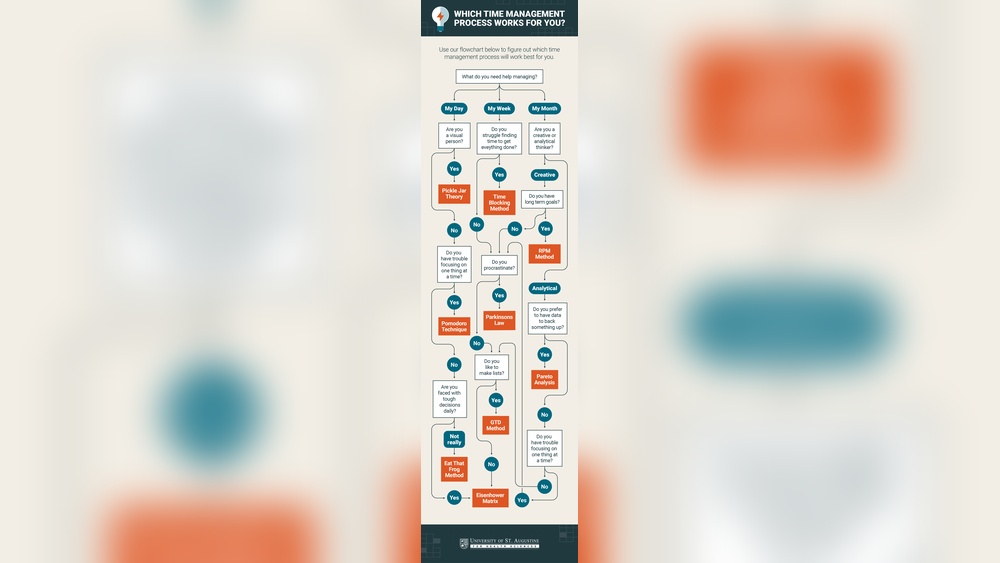
Pomodoro Technique splits work into focused 25-minute sessions. After each session, take a short 5-minute break to recharge. This cycle repeats four times, followed by a longer rest period. Method improves concentration by creating a sense of urgency and structure.
Regular breaks help prevent burnout and maintain mental energy. Many productivity apps support the Pomodoro Technique for better time tracking and focus management.
Eisenhower Matrix
Eisenhower Matrix sorts tasks by urgency and importance. It divides work into four clear categories: urgent and important, important but not urgent, urgent but not important, and neither urgent nor important. This framework helps decide what to do immediately, schedule for later, delegate to others, or eliminate.
Clear prioritization prevents wasting time on trivial tasks. Professionals use this productivity method to focus on what truly matters and improve time management.
Eat That Frog Method
Eat That Frog method advises tackling the hardest task first. This task is usually the most important or most challenging. Completing it early builds strong momentum for the rest of the day. It helps reduce procrastination, improve focus, and boost confidence. A simple productivity rule keeps busy days productive, organized, and less stressful.
AI in Time Management
Artificial intelligence plays an important role in time management for busy professionals. It helps manage schedules, prioritize tasks, and send timely reminders. AI-based tools reduce manual work and improve efficiency.
These tools learn user preferences and habits to offer personalized assistance. They adapt to changes and suggest better ways to organize the day. Using AI can make managing time less stressful and more productive.
Smart Scheduling
AI can analyze calendars and find the best times for meetings. It avoids conflicts and suggests slots that fit everyone’s availability. Smart scheduling saves time spent on back-and-forth emails.
Some tools also consider travel time and work hours. This helps plan realistic schedules without overbooking. AI learns from past meetings to improve future scheduling.
Automated Task Prioritization
AI ranks tasks based on deadlines and importance. It helps focus on what needs attention first. This reduces stress and keeps work on track.
Tasks with high urgency or impact get highlighted. Low-priority tasks can be postponed or delegated. AI adjusts priorities as new tasks arrive or conditions change.
Ai-powered Reminders
Reminders powered by AI arrive at the right moment. They prevent missed deadlines and forgotten duties. Some tools use smart notifications based on your habits.
AI can also suggest breaks or follow-ups. This keeps productivity high without burnout. These reminders make sure nothing important slips through the cracks.
Choosing The Right Tool
Choosing the right time management tool can save hours every week. It helps busy professionals keep tasks organized and meet deadlines. Each tool offers unique features, so selecting one that fits your work style is essential.
Understanding what you need from a tool makes the decision easier. Some focus on task lists, others on calendar management or time tracking. Knowing your priorities guides you to the best choice.
Assessing Your Needs
Start by listing your daily tasks and challenges. Do you need reminders, project tracking, or collaboration features? Consider if you manage personal tasks alongside work duties. This step helps match tools to your workflow.
Free Vs Paid Options
Many tools offer free versions with basic functions. Paid versions provide advanced features like more storage or integrations. Think about what features are critical before spending money. Free trials can help you test before buying.
Integration With Other Apps
Check if the tool works well with your current apps. Syncing with email, calendars, or project platforms saves time. Smooth integration reduces switching between programs and keeps information consistent.
User Experience And Interface
Choose a tool with a simple and clear interface. Busy professionals need quick access to tasks without confusion. A clean design helps reduce stress and increases daily usage. Test a few to find one you enjoy using.

Tips For Effective Use
Effective use of time management tools can transform your daily routine. These tools help busy professionals stay organized and focused. Simple strategies improve their efficiency and reduce stress. Follow these tips to get the most from your chosen tool.
Setting Realistic Goals
Start by defining clear and achievable goals. Break large tasks into smaller steps. Set deadlines that fit your workload. Avoid setting too many goals at once. Realistic goals keep you motivated and on track.
Regular Review and Adjustment
Check your progress often. Adjust your plans based on what works best. Update tasks and priorities regularly. This keeps your schedule flexible and realistic. Regular reviews prevent tasks from piling up.
Avoiding Overload
Do not overload your to-do list. Focus on a few important tasks each day. Learn to say no to extra work when needed. Overloading causes stress and lowers productivity. Balance work and rest to stay effective.
Leveraging Notifications
Use notifications to remind you of important tasks. Customize alerts to avoid constant interruptions. Set reminders for deadlines and meetings. Notifications help keep you focused without distraction. Use them wisely to manage your time well.
Popular Free Tools
Free time management tools offer smart solutions for busy professionals. These tools help plan tasks, set reminders, and organize work efficiently. Many popular options provide user-friendly features without any cost.
They suit different work styles and team sizes. Exploring these tools can improve daily productivity and reduce stress.
Google Calendar
Google Calendar is a simple and powerful tool. It helps schedule meetings and set event reminders. Users can create multiple calendars for work and personal life. It syncs across devices automatically.
Sharing calendars with colleagues improves team coordination. The interface is clean and easy to use. Notifications keep important deadlines visible at all times.
Trello
Trello uses boards, lists, and cards to organize tasks visually. It suits project management and daily to-do lists. Users can move cards to show task progress. Adding due dates, labels, and attachments is simple.
Trello supports team collaboration with comments and mentions. Its drag-and-drop feature makes task updates fast. The free plan offers unlimited cards and boards.
Asana
Asana helps teams track work from start to finish. It offers task lists, timelines, and project views. Users can assign tasks and set priorities easily. The tool sends reminders to keep deadlines on track.
Asana integrates with many other apps for a smooth workflow. Its free version supports up to 15 team members. Perfect for managing both simple and complex projects.
Time Management For Different Roles
Time management needs differ based on daily tasks and roles. Choosing the right tools helps improve focus and efficiency. Different roles face unique challenges that demand tailored solutions.
Exploring tools by role shows how busy professionals, students, and business owners manage their time effectively. Each group benefits from specific features suited to their schedules and priorities.
Busy Professionals
Busy professionals juggle meetings, deadlines, and tasks every day. Tools like Todoist and Microsoft To Do help organize tasks by priority. Calendar apps sync appointments and send reminders to avoid missed meetings. Time trackers such as Toggl show where hours go, improving productivity. Simple interfaces reduce time spent managing the tool itself.
Students
Students balance classes, assignments, and study sessions. Apps like Google Calendar and MyStudyLife manage schedules and deadlines clearly. Pomodoro timers boost focus during study periods. Note-taking apps help keep information organized. These tools support planning and reduce last-minute stress.
Business Owners
Business owners handle operations, staff, and growth tasks daily. Project management tools like Trello and Asana track progress and assign tasks easily. Financial and inventory apps keep business details in check. Automating repetitive tasks saves time for strategic decisions. These tools create structure in busy business environments.

FAQ:
What Are the Best Time Management Tools for Professionals?
Top time management tools include Todoist, Trello, Asana, and Microsoft To Do. They help prioritize tasks, track progress, and boost productivity efficiently.
How Do Time Management Apps Improve Productivity?
These apps organize tasks, set reminders, and minimize distractions. They enable users to focus better and complete work within deadlines.
Are Free Time Management Tools Effective?
Yes, many free tools like Google Tasks and Microsoft to Do offer essential features. They support task organization and time tracking without extra cost.
Which Techniques Complement Time Management Tools?
Techniques like Pomodoro, Eisenhower Matrix, and Eat That Frog enhance tool effectiveness. They help in prioritizing tasks and managing work intervals.
Choosing the right time management tool can improve daily productivity. Each tool offers unique features to fit different work styles. Testing a few helps find what works best for you. Staying organized reduces stress and boosts focus. Simple tools often make the biggest difference.
Take small steps to manage your tasks better. Consistent use leads to better time control. Try combining methods for even more efficiency. Busy professionals can regain time and balance. Start today and watch your productivity grow.
https://akperbinalitasudama.ac.id/
https://akfisstlukastomohon.ac.id/
https://akbidjakartamitrasejahtera.ac.id/
https://akperpemkabacehtenggara.ac.id
https://aklpemprovsumsel.ac.id/
https://poltekkessbengkulu.ac.id/
https://akabidartakabanjahe.ac.id/
https://atrowidyadharma.ac.id/
https://akbidhafsyahmedan.ac.id/
https://akbidindahmedan.ac.id/
https://akbiddelhusdelmed.ac.id/
https://akperharapanmamadeliserdang.ac.id/
https://stmiktrigunapati.ac.id/
https://akbidikabinalabuhanbatu.ac.id/
https://akbidbungabangsaaceh.ac.id/
https://ejournal.akbidbungabangsaaceh.ac.id/
stikes cianjur
stikes demak
stikes garut
stikes gorontalo
stikes gowa
stikes gresik
stikes pacitan
stikes pamekasan
stikes pandeglang
stikes pangandaran
strong democracy
suara aceh
suara banten
suara jabar
suara jambi
suara jateng
suara jatim
suara jogja
suara riau